

Tukar - Image Converter & Background Remover
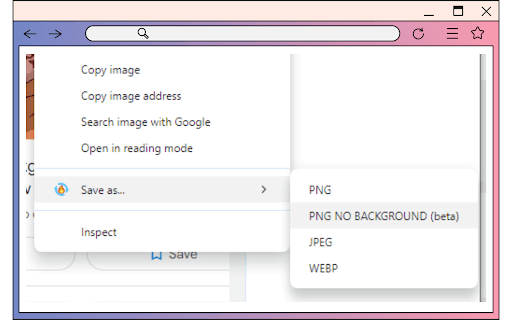
Easily remove image backgrounds and convert image formats with just a few clicks for professional results.
About Tukar - Image Converter & Background Remover
This user-friendly tool simplifies background removal and image format conversion with minimal effort. It enables quick transformation of images for web and print, eliminating manual editing and streamlining your workflow.
How to Use
Upload your image, choose the target format, and click to remove the background and perform the conversion instantly.
Features
- Quick and efficient image format conversion
- Advanced background removal for clean results
- Supports JPEG, PNG, WebP, and more
- Simple interface for fast editing
Use Cases
- Preparing product images for online stores
- Converting images for website optimization
- Removing backgrounds from photos for marketing
- Converting videos to MP4 for compatibility
Best For
Web developersSocial media managersContent creatorsGraphic designersE-commerce entrepreneurs
Pros
- Supports a wide range of image formats
- User-friendly with one-click tools
- Includes video format conversion
- Premium options enhance background removal quality
Cons
- Background removal accuracy may vary with complex images
- Video conversion currently limited to MP4
- Premium features require a subscription
FAQs
Which image formats can I convert?
You can convert images seamlessly between JPEG, PNG, and WebP formats.
What video formats does the tool support?
The tool currently supports converting videos to MP4 format.
How does premium background removal improve results?
Premium features offer higher quality background removal and include an anime art background remover.
Is the background removal suitable for all images?
While effective for most images, results may vary depending on complexity and background details.
Can I use this tool for e-commerce product images?
Yes, it is ideal for removing backgrounds and optimizing images for online stores.