

Tuxpin
Tuxpin leverages advanced AI text-to-speech technology to transform webpages into audio podcasts, enabling convenient listening on the go.
About Tuxpin
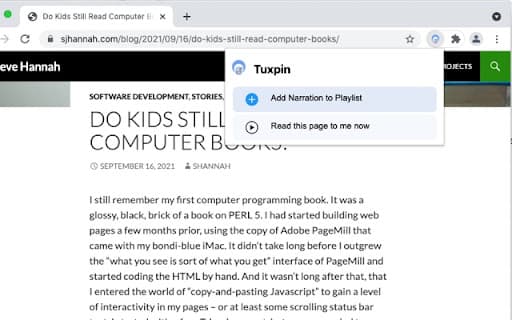
Tuxpin utilizes cutting-edge AI-powered text-to-speech technology that sounds remarkably natural. This browser extension adds a button to your toolbar, enabling you to send any webpage directly to your preferred podcast app. Listen to articles and web content effortlessly during commutes, workouts, or chores, turning online reading into hands-free audio experiences.
How to Use
Install the Tuxpin browser extension. Click the toolbar icon on any webpage to convert its content into a podcast and send it to your favorite listening app for later use.
Features
- Realistic AI-driven text-to-speech conversion
- Supports offline playback
- Seamless browser extension integration
- Compatible with popular podcast apps
Use Cases
- Listening to articles during daily commutes
- Keeping up with news while doing chores
- Learning new topics during workouts
Best For
Students seeking audio learningIndividuals who prefer listening over readingCommuters needing hands-free contentBusy professionals multitasking
Pros
- Simple setup with browser extension for quick access
- Enables offline listening for convenience
- Provides a hands-free way to consume web content
- Delivers natural-sounding speech with AI technology
Cons
- Compatibility issues may occur with some websites
- Speech quality depends on AI, which may vary
- Requires a compatible podcast app for optimal use
FAQs
How does Tuxpin convert webpages into audio?
Tuxpin uses AI text-to-speech technology to turn webpage text into natural-sounding speech, allowing you to listen via your podcast app.
What do I need to start using Tuxpin?
You need a compatible web browser, the Tuxpin extension installed, and a podcast app on your device.
Is Tuxpin compatible with all websites?
While it works with most websites, some pages with complex layouts or scripts may not convert perfectly.
Can I listen offline with Tuxpin?
Yes, Tuxpin supports offline playback once the content is sent to your podcast app.
Is Tuxpin suitable for multitasking during activities?
Absolutely, it enables hands-free listening, making it ideal for commuting, exercising, or household chores.