

Two Way Voice for Bing AI
A voice interaction extension for Bing AI that enables users to ask questions and receive responses using voice commands.
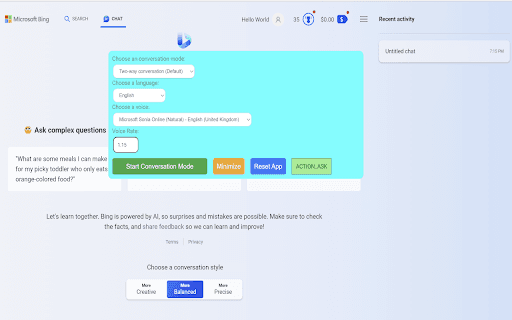
About Two Way Voice for Bing AI
Enhance your Bing AI experience with this voice interaction extension. It allows you to ask questions verbally and receive spoken or text responses. Designed for convenience, it supports multiple languages including Nepali, Chinese, and Korean, making voice-based interactions seamless and accessible.
How to Use
Activate conversation mode on the Bing AI website. The extension manages dialogue flow between your voice inputs and Bing AI's replies. Choose from modes like two-way voice, voice input with text reply, or text input with voice reply for flexible interaction.
Features
- Voice-activated questions and responses
- Supports multiple languages including Nepali, Chinese, and Korean
- Automatic management of conversation turns
- Multiple interaction modes for flexibility
Use Cases
- Learning new topics through voice queries
- Hands-free information retrieval
- Engaging voice-based conversations with Bing AI
Best For
Users seeking hands-free information accessLanguage learners practicing pronunciationIndividuals in quiet settings using headphonesPeople preferring voice-based interactions
Pros
- User-friendly and easy to operate
- Supports multiple languages for broad accessibility
- Offers various modes to suit different needs
- Provides hands-free convenience
Cons
- Voice-to-text accuracy may vary with system resources
- Downloading additional voices might take time
- Performance can decline during high CPU usage
FAQs
How does the extension support different languages?
It uses your browser’s built-in voice recognition to understand and transcribe speech in languages like Nepali, Chinese, and Korean, converting spoken words into text accurately.
Are there any additional downloads needed?
Yes, the extension may automatically download extra voices for text-to-speech functionality, depending on your browser settings. Download times depend on your system and network.
Is this extension officially affiliated with Microsoft?
No, this extension is independently developed and is not officially connected or endorsed by Microsoft.
Can I use this extension on mobile devices?
Compatibility varies; check your device and browser support for voice interaction features to ensure optimal performance.
What should I do if voice recognition is inaccurate?
Ensure your microphone is properly configured, clear of background noise, and that your browser permissions are enabled for microphone access.