

Udemy Summary: Harness the Power of ChatGPT
An advanced tool that summarizes Udemy courses using ChatGPT, enabling efficient and effective learning.
About Udemy Summary: Harness the Power of ChatGPT
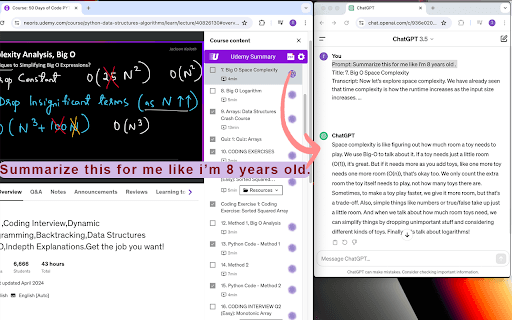
Udemy Summary: Harness the Power of ChatGPT is an innovative tool that provides concise summaries of Udemy course sections. Designed to save time and improve understanding, it offers an affordable way to grasp course content quickly and effectively.
How to Use
Open the 'Course Content' page within your Udemy course. Click the AI icon on any section to generate a summary. Adjust prompts and language settings in the preferences. For detailed summaries, export sections as a PDF and utilize the aipdf plugin for further analysis.
Features
- Customizable prompts to tailor summaries to your needs
- PDF export option for comprehensive course summaries
- Quick, concise summaries of Udemy course videos
Use Cases
- Quickly identify key points in Udemy courses without watching entire videos
- Create detailed summaries for in-depth review of lengthy courses
- Improve understanding and retention of course material
Best For
Professionals seeking efficient learningLifelong learners aiming to optimize study timeStudents pursuing quick course insightsOnline learners prioritizing content retentionEducators and trainers
Pros
- Affordable one-time payment for unlimited access
- Saves time with quick, clear summaries
- Flexible prompts and language options
- Boosts comprehension and memory retention
- Easy-to-use interface with simple activation
Cons
- PDF generation may be slow for lengthy courses
- Sections with slow or non-loading videos are skipped
- Requires an active internet connection for continuous operation
Pricing Plans
Choose the perfect plan. All plans include 24/7 support.
FAQs
What is the cost of lifetime access to Udemy Summary?
Lifetime access is available for a one-time fee of $4.9.
How do I activate the Udemy Summary tool?
Go to the course content page on Udemy and click the AI icon in any section.
What if a video takes a long time to load?
Videos that load slowly or do not load will be skipped automatically.
How long does it take to generate a PDF summary?
Loading time varies based on course size; extensive courses may take up to an hour.
Can I customize the summaries?
Yes, you can adjust prompts and language preferences in the settings.