

UI Copilot
An AI-enhanced Chrome extension delivering real-time user interface design feedback.
About UI Copilot
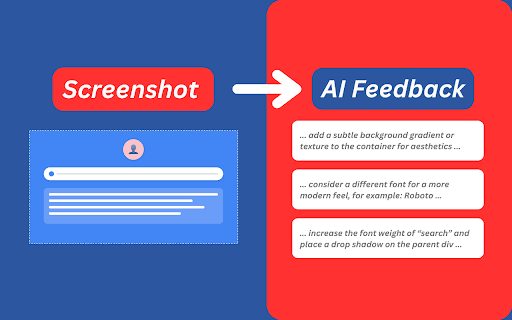
UI Copilot is a Chrome extension that offers instant, AI-driven feedback on website user interfaces. It assists designers, developers, and UI/UX enthusiasts in refining layouts, color choices, typography, and more through insightful suggestions powered by advanced AI analysis.
How to Use
Open UI Copilot from your Chrome toolbar, select a webpage area with the capture tool, and receive comprehensive design suggestions within seconds, tailored to your selection.
Features
- Webpage screen capture for targeted analysis
- Instant AI-driven UI design insights
- Compatible with public websites, localhost, and development environments
- Provides recommendations on layout, color schemes, and typography
Use Cases
- Learning UI design principles during browsing
- Optimizing the UI/UX of websites and apps
- Enhancing developer UI skills
- Seeking design feedback for improvements
Best For
Web developersUI/UX designersDesign enthusiastsFront-end developersDigital agencies
Pros
- Provides actionable tips for UI elements
- Free during the testing phase
- Compatible with various website types
- Offers immediate AI-based design insights
- Simple, intuitive screen capture feature
Cons
- AI feedback may not always be perfectly accurate
- Limited scope of suggested improvements
- Future pricing details after the Beta are not yet available
FAQs
What is UI Copilot?
UI Copilot is a Chrome extension that offers instant AI-powered feedback to improve website user interfaces.
How does UI Copilot operate?
Activate the extension, select a webpage section, and receive customized design suggestions within seconds.
Is UI Copilot free to use?
Yes, it is completely free during its Beta testing period.
Can I use UI Copilot on local websites?
Absolutely, it works seamlessly on public sites, localhost, and development servers.
What types of design feedback does UI Copilot provide?
It offers suggestions on layouts, color schemes, typography, and overall UI improvements.