

VidDigest - ChatGPT for Youtube Videos
A browser extension that leverages ChatGPT to improve your understanding of YouTube videos by providing detailed insights and transcript analysis.
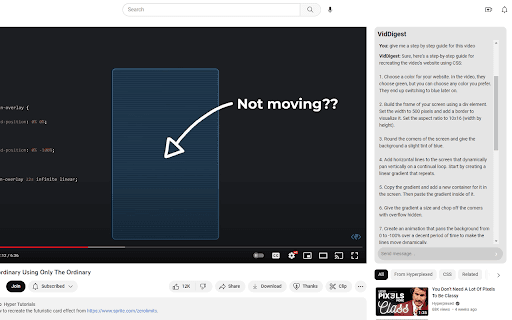
About VidDigest - ChatGPT for Youtube Videos
VidDigest is a powerful browser extension that transforms your YouTube viewing experience. By harnessing ChatGPT, it offers detailed insights, contextual analysis, and answers based on video transcripts. Enhance your understanding with in-depth analysis, question support, and creative assistance directly within your browser.
How to Use
Install the extension to seamlessly integrate with YouTube. It analyzes the video's transcript, sends it to ChatGPT, and displays relevant, insightful responses alongside the video for a more informed viewing experience.
Features
- Provides feedback to refine ChatGPT responses
- Analyzes transcripts for contextual insights
- Includes a dark mode for comfortable viewing
- Integrates smoothly with YouTube
- Enables access to ChatGPT directly on YouTube
Use Cases
- Gain detailed analysis of YouTube videos
- Quickly grasp key points through transcript summaries
- Utilize ChatGPT for creative ideas related to videos
- Ask questions and receive contextual video content answers
Best For
Content creatorsStudentsResearchersAnyone seeking deeper video understanding
Pros
- Enhances YouTube viewing with AI-driven insights
- Offers a dark mode for comfortable use
- Allows user feedback to improve ChatGPT responses
- Provides seamless integration and easy accessibility
- Delivers contextual responses based on video transcripts
Cons
- Dependent on ChatGPT's accuracy and potential biases
- Currently limited to YouTube platform
- Effectiveness relies on transcript quality
FAQs
What is VidDigest?
VidDigest is a browser extension that enhances your YouTube experience by providing ChatGPT-powered insights and detailed transcript analysis.
How does VidDigest function?
It analyzes YouTube video transcripts, processes them through ChatGPT, and displays relevant responses alongside videos for better understanding.
Is VidDigest free to use?
Yes, VidDigest is available at no cost.
Can VidDigest be used on platforms other than YouTube?
Currently, it is designed exclusively for YouTube, but future updates may include support for other platforms.
Does VidDigest require any special setup?
Once installed, it integrates seamlessly with YouTube, requiring no additional setup beyond initial installation.
What are the system requirements for VidDigest?
It works on most modern browsers with compatible extensions; specific requirements are detailed in the extension documentation.