

Voice Control for Netflix
Easily control Netflix using your voice, including play, pause, fast-forward, and more for a seamless viewing experience.
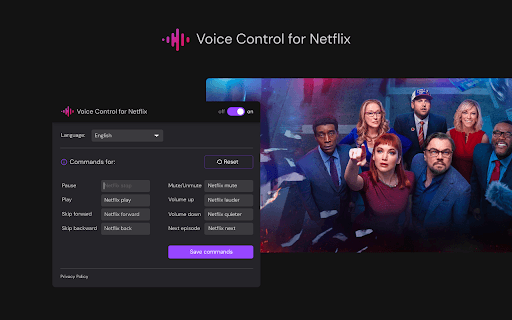
About Voice Control for Netflix
Voice Control for Netflix enables users to operate their streaming experience through simple voice commands. Easily play, pause, fast-forward, and navigate content without using a remote or touching the screen, enhancing convenience and accessibility.
How to Use
Activate Voice Control for Netflix in your settings, then issue voice commands to control playback, browse menus, or search for shows and movies.
Features
- Voice search for movies and TV shows
- Hands-free navigation of Netflix menus
- Voice commands to control playback (play, pause, rewind, fast-forward)
Use Cases
- Controlling Netflix while cooking or exercising
- Enjoying hands-free operation during movie nights
- Helping users with mobility impairments navigate Netflix easily
Best For
Multitasking usersTech-savvy enthusiastsIndividuals with mobility challenges
Pros
- Enhances accessibility for users with mobility impairments
- Simplifies multitasking during streaming
- Enables hands-free Netflix control
Cons
- Reliance on voice recognition accuracy
- May require a quiet environment for optimal performance
- Learning curve for mastering voice commands
FAQs
What actions can I perform with Voice Control for Netflix?
You can play, pause, rewind, fast-forward, navigate menus, and search for content using your voice commands.
How do I enable Voice Control on Netflix?
Activate Voice Control in your device settings and link it to your Netflix app to start using voice commands.
Is Voice Control compatible with all devices?
Compatibility depends on your device's voice recognition features; check your device specifications for support.
Can I control multiple profiles with Voice Control?
Yes, voice commands can be used to switch between profiles if supported by your device and Netflix setup.
What should I do if voice commands are not working?
Ensure your microphone is enabled, speak clearly in a quiet environment, and verify your device's voice recognition settings.