

Wavenet for Chrome
A Google Cloud TTS-powered Chrome extension that converts highlighted text into natural, high-quality audio for improved accessibility and learning.
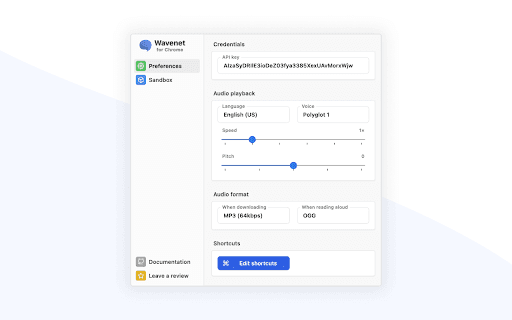
About Wavenet for Chrome
This Chrome extension leverages Google Cloud's Text-to-Speech technology to turn highlighted text into natural, high-quality audio. Users must generate their own API key to activate the service. It supports all Google WaveNet, Neural2, News, and Studio voices across multiple languages. Users can customize pitch and speed settings, download audio as MP3 files, and utilize SSML for advanced speech customization. To handle longer texts, the extension intelligently chunks sentences to stay within character limits and reduce costs.
How to Use
First, create a Google Cloud API key. Highlight the desired text, then activate the extension to convert it into speech. Adjust pitch and speed as needed. To download the audio, click the download button. Use Cmd+Shift+S (macOS) or Ctrl+Shift+S (Windows) to listen aloud. Use Cmd+Shift+E (macOS) or Ctrl+Shift+E (Windows) to save the audio as an MP3 file.
Features
- Adjustable pitch and speech speed for personalized audio
- Converts selected text into natural-sounding speech using Google Cloud TTS
- Download speech output as MP3 files
- Supports SSML for advanced speech customization
- Compatible with all Google WaveNet, Neural2, News, and Studio voices and languages
- Chunks lengthy texts into sentences to avoid character limits and reduce costs
Use Cases
- Create accessible audio versions of written content
- Proofread documents by listening to them
- Enjoy articles and PDFs audibly instead of reading
- Improve pronunciation skills in foreign languages
Best For
Pros
- Quick access with keyboard shortcuts
- Customizable pitch and speech rate
- Supports SSML for detailed voice control
- Produces high-quality, natural audio
- Offers extensive voice and language options
- Efficient sentence chunking for long texts
- Enables MP3 file downloads
Cons
- Requires a Google Cloud API key for operation
- Limited to features provided by Google Cloud TTS
- Potential costs based on Google Cloud usage