

Website Reader for Claude
Enhance your Claude conversations by effortlessly sharing webpage content through this browser extension that extracts and attaches webpage data.
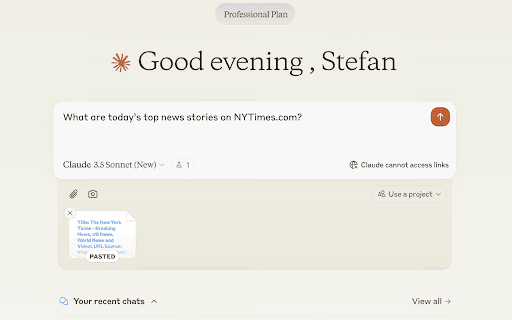
About Website Reader for Claude
The Website Reader for Claude is a user-friendly browser extension designed to streamline sharing web content within Claude conversations. It automatically extracts webpage information from URLs, eliminating manual copying, pasting, or taking screenshots. This functionality enables Claude to understand and discuss entire web pages effectively.
How to Use
Paste a URL into your Claude chat. The extension uses Jina.ai Reader to automatically extract and attach the webpage content to your message for seamless discussion.
Features
- Accurate content formatting
- Instant web content sharing
- User-friendly and quick setup
- Prioritizes user privacy
Use Cases
- Sharing articles for discussion with Claude
- Providing context from online documentation
- Enabling web page analysis and summaries by Claude
Best For
StudentsResearchersWritersContent creatorsProfessionals using Claude for research
Pros
- Eliminates manual copying and formatting
- Ensures user privacy with no data storage
- Maintains webpage formatting and structure
- Automatically extracts and attaches content
- Facilitates quick sharing of web pages
Cons
- Dependent on Jina.ai Reader for extraction
- Limited to use on claude.ai platform
FAQs
How does the Website Reader for Claude function?
Simply paste a URL into your chat. The extension automatically extracts webpage content with Jina.ai Reader and attaches it, enabling Claude to analyze and discuss the page.
On which platform does this extension operate?
This extension works exclusively on claude.ai.
Is my data protected when using this extension?
Yes, it is privacy-focused and does not store or track any user data.
Can I share any type of webpage content with Claude?
Yes, the extension can extract most standard webpage content for sharing and discussion.
Do I need technical skills to use this extension?
No, it is designed for easy use—simply paste URLs and let the extension handle the rest.