

Whisper Text Reader
A browser extension that converts selected text into speech, providing a seamless text-to-speech reading experience.
About Whisper Text Reader
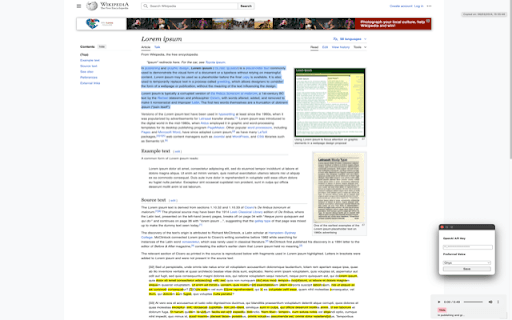
Read Aloud is a powerful browser extension that transforms web page text into speech using advanced text-to-speech technology. It supports multiple voices and languages, allowing users to customize their listening experience. The extension integrates effortlessly with popular browsers, enabling quick text selection and audio playback with a simple right-click.
How to Use
Select the desired text on a webpage, right-click, and choose 'Read this text aloud' to listen. You can also customize voice settings through the extension menu.
Features
- Converts webpage text into speech with natural voices
- Supports multiple languages and voice options
- Easy right-click activation for quick listening
- Customizable speech speed and pitch
- Supports keyboard shortcuts for accessibility
Use Cases
- Listening to articles and research papers
- Assisting users with visual impairments
- Language learning and pronunciation practice
- Proofreading written content
- Multitasking while consuming web content
Best For
StudentsVisually impaired usersMultilingual speakersResearchersProofreadersLanguage learnersContent creators
Pros
- Improves web accessibility for users with visual impairments
- Offers a variety of natural-sounding voices and languages
- Enhances comprehension and proofreading efficiency
- Simple right-click interface for quick activation
- Customizable speech settings for a personalized experience
Cons
- Performance depends on the quality of the TTS engine
- Requires browser extension installation
- Pronunciation accuracy may vary for complex words or names
- Limited free voice options compared to premium choices
Pricing Plans
Choose the perfect plan. All plans include 24/7 support.
FAQs
How do I activate Read Aloud on a webpage?
Highlight the desired text, right-click, and select 'Read this text aloud' from the context menu.
Can I change the voice used by Read Aloud?
Yes, you can select different voices and languages through the extension's settings or popup menu.
Does Read Aloud support multiple languages?
Absolutely, it supports numerous languages, enabling you to listen to text in your preferred language.
Is Read Aloud free to use?
Yes, it is free to download and use, with optional premium voices available for enhanced options.
Can I customize the speech speed and pitch?
Yes, the extension allows you to adjust speech rate, pitch, and volume for a tailored listening experience.