

Wholemeaning Email Manager
An AI-powered email management tool that prioritizes critical messages and identifies sales opportunities, customer issues, and potential risks.
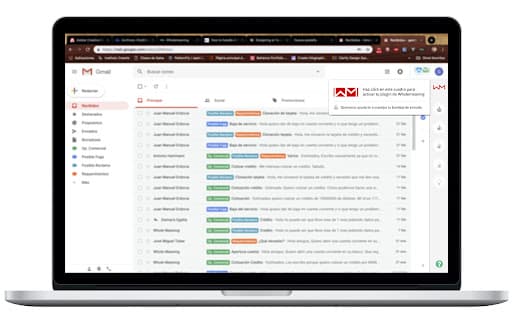
About Wholemeaning Email Manager
Wholemeaning Email Manager utilizes advanced AI algorithms to prioritize relevant emails, detect sales opportunities, identify customer churn risks, and highlight potential issues for proactive management.
How to Use
Integrate the plugin with Gmail to view a dashboard displaying unread important emails and receive real-time alerts. To resolve an alert, reply to the email or click the resolve button at the top of the panel.
Features
- Identifies sales opportunities within emails
- Sends notifications for high-priority messages
- Uses AI to prioritize email content effectively
- Highlights customer needs and potential issues
- Seamlessly integrates with Gmail
- Detects signs of customer churn
Use Cases
- Discovering sales leads through email analysis
- Handling customer requests efficiently
- Prioritizing critical emails to improve response times
- Monitoring customer satisfaction to prevent churn
Best For
Business ownersAccount managersSales teamsCustomer support representativesProject managers
Pros
- Easy integration with Gmail for streamlined workflow
- Helps identify sales opportunities and potential risks
- Prioritizes important emails to boost productivity
- User-friendly interface with clear alert options
Cons
- Pricing details are not specified, making cost evaluation difficult
- Requires Gmail account for operation
- AI accuracy may vary, affecting reliability
FAQs
What is Wholemeaning Email Manager?
It is an AI-powered tool that prioritizes important emails and detects sales opportunities, customer issues, and potential risks.
How does the plugin connect to Gmail?
It seamlessly integrates with Gmail, providing a dashboard with unread important emails and delivering real-time alerts.
How can I resolve an alert?
You can close an alert by replying to the email or marking it as resolved using the resolve button in the plugin panel.
Is this tool suitable for sales teams?
Yes, it helps sales teams identify leads and prioritize correspondence for faster follow-up.
Does it help with customer retention?
Absolutely, by detecting early signs of customer dissatisfaction, it assists in proactive engagement to reduce churn.