

Wonderfall
Wonderfall is an intuitive web browsing assistant that simplifies tab management and streamlines online information organization.
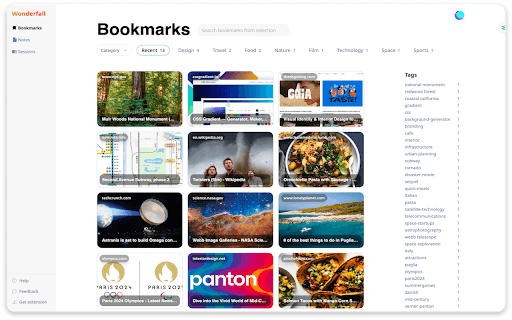
About Wonderfall
Wonderfall is a comprehensive web browsing companion designed to reduce tab overload and enhance information organization. It features one-click smart bookmarking, distraction-free note-taking, and the innovative "Sessions" feature for grouping related content, making web navigation more efficient and organized.
How to Use
Install the Wonderfall extension for Chrome. Save web pages instantly with one-click bookmarking. Take notes directly in the browser and link them to sources. Use the "Sessions" feature to organize related bookmarks and notes for quick access.
Features
- Innovative "Sessions" for grouping related content
- Streamlined organization of bookmarks and notes
- One-click smart bookmarking for quick saves
- Easy collaboration with others
- Secure local data storage with optional cloud sync
- Distraction-free note-taking experience
Use Cases
- Managing numerous browser tabs efficiently
- Collecting and organizing recipes for food enthusiasts
- Conducting research for academic papers
- Planning trips for travel enthusiasts
- Performing market research for professionals
Best For
Users with many open tabsProfessionals seeking organized browsingStudents managing researchTravel plannersMarket researchersRecipe collectors
Pros
- Ensures secure, private data storage
- Supports seamless collaboration
- Helps connect ideas for better learning
- Reduces tab clutter and overload
- Speeds up browsing with streamlined management
- Enhances productivity through organized information
Cons
- Requires installing a browser extension
- Cloud sync is optional, which may limit accessibility
- Effectiveness depends on user adoption of organizational features
FAQs
What is Wonderfall?
Wonderfall is a web browsing tool that helps manage tabs and organize online content with features like bookmarking, note-taking, and grouping related items.
How does Wonderfall improve organization?
It offers AI-generated tags, automatic content categorization, and the "Sessions" feature to group related bookmarks and notes, simplifying content management.
Is Wonderfall secure and private?
Yes, it encrypts your data and stores it locally. Cloud sync is optional, giving you control over your information.
Can I collaborate with others using Wonderfall?
Yes, Wonderfall enables easy collaboration, allowing you to share and work on content with colleagues or friends.
Does Wonderfall support multiple devices?
Yes, with optional cloud synchronization, you can access your bookmarks and notes across multiple devices.