

Youtube Assistant
An AI-enhanced Chrome extension that provides instant answers to questions about YouTube videos.
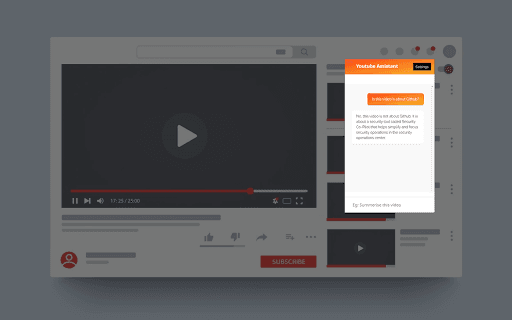
About Youtube Assistant
The YouTube Assistant Chrome extension utilizes artificial intelligence to enrich your viewing experience. It enables users to ask questions about any YouTube video and receive detailed responses powered by OpenAI, offering valuable insights and information seamlessly.
How to Use
Install the extension, enter your OpenAI API key, and ask questions about any YouTube video directly within your browser.
Features
- AI-driven question answering for YouTube videos
Use Cases
- Gain quick insights by asking specific questions about YouTube content
- Summarize lengthy videos with targeted queries
- Enhance research and content creation with instant video analysis
Best For
ResearchersStudentsContent creatorsVideo enthusiastsEducators
Pros
- Delivers instant answers about YouTube videos
- Utilizes OpenAI's API for high-accuracy responses
- Simple setup and user-friendly interface
Cons
- Response quality depends on OpenAI API performance
- Requires an OpenAI API key, which may involve costs
FAQs
What do I need to start using the YouTube Assistant extension?
You need to install the Chrome extension and provide your OpenAI API key.
How can I access the source code for the YouTube Assistant?
You can purchase the source code at https://kitesdev.gumroad.com/l/youtubassistant
Is the extension free to use?
The extension is free to install; however, using OpenAI's API may incur costs based on your usage.
Can I ask questions about any YouTube video?
Yes, the extension allows questions on any publicly available YouTube video.
Is the extension compatible with all browsers?
This extension is specifically designed for Google Chrome and may not work on other browsers.