

YouTube Real Time Translation
Real-time translation tool for YouTube videos that enables instant understanding of content across different languages.
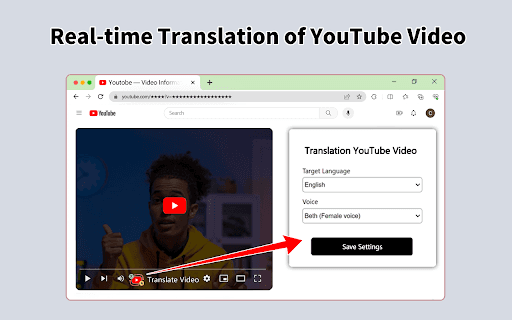
About YouTube Real Time Translation
This service provides automatic, real-time translation of YouTube videos, allowing viewers to watch in their preferred language. It offers synchronized subtitles that make international content accessible and easy to understand, regardless of the original language.
How to Use
Access your chosen YouTube video through the platform. The system automatically detects the original language and displays translated subtitles in your preferred language in real time.
Features
- Supports a wide range of languages
- Provides real-time subtitles for YouTube videos
- Automatically detects the video's original language
Use Cases
- Watching international news segments
- Enjoying foreign-language movies and shows
- Understanding language tutorials from other countries
Best For
Global viewersInternational professionalsResearchers analyzing foreign contentLanguage learners seeking practiceStudents studying new languages
Pros
- Enables instant translation, saving time
- User-friendly and easy to operate
- Expands access to global media content
- Bridges language gaps effectively
Cons
- Possible delays or buffering issues
- Requires a stable internet connection
- May not fully capture linguistic nuances
- Translation accuracy can vary depending on context
FAQs
How accurate are the translations?
Translation accuracy depends on the complexity of the language and audio quality. While highly reliable, some nuances may sometimes be missed.
Which languages are supported?
The service supports many languages, including popular options like English, Spanish, French, German, Chinese, and Japanese, among others.
Is an internet connection necessary?
Yes, a stable internet connection is essential for delivering real-time translations and smooth video playback.
Can I customize the translation settings?
Yes, users can select their preferred language and enable or disable subtitles according to their viewing preferences.
Does this work on all devices?
The service is compatible with most devices that support YouTube, including desktops, tablets, and smartphones.