

Youtube Sentiment Analysis
A Chrome extension that performs sentiment analysis on YouTube comments using the VADER model, providing visual insights directly within the YouTube interface.
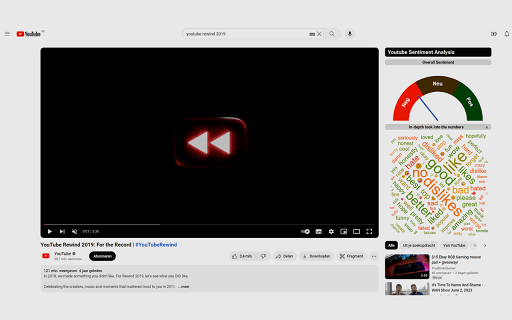
About Youtube Sentiment Analysis
The YouTube Comment Sentiment Analysis Chrome extension, developed as part of a KU Leuven course, leverages the VADER sentiment model to evaluate comments under YouTube videos. It integrates clear sentiment visualizations directly into the YouTube interface, helping users easily interpret comment sentiment and enhance their understanding of audience reactions.
How to Use
Install the extension in Chrome. It automatically analyzes comments on YouTube videos and displays sentiment visualizations within the YouTube interface for quick insights.
Features
- Analyzes YouTube comments' sentiment with the VADER model
- Displays sentiment visualizations seamlessly within YouTube
Use Cases
- Assessing audience sentiment for content creators
- Gaining insights into overall video reception
Best For
YouTube content creatorsAcademic researchersSocial media analystsMarket researchersData scientists
Pros
- Enables quick sentiment evaluation of YouTube comments
- Supports research on comment sentiment visualization
- Provides intuitive visual sentiment representations
Cons
- Accuracy depends on the VADER model's quality and visualization clarity
- Limited to analyzing YouTube comments only
- Relies on the VADER sentiment algorithm, which may have limitations
FAQs
What is the primary function of this Chrome extension?
It analyzes YouTube comments' sentiment using the VADER model and visualizes the results to help users understand audience opinions.
How does the extension display sentiment analysis?
It embeds sentiment visualizations directly into the YouTube interface, allowing users to see comment sentiment insights while browsing videos.
Who can benefit from this extension?
Content creators, researchers, and social media analysts can use it to evaluate audience reactions and study comment sentiment trends.
Is this extension free to use?
Yes, the extension is available at no cost and can be easily installed from the Chrome Web Store.
Can I customize the sentiment visualization settings?
Currently, the extension offers predefined visualizations, with future updates possibly including customization options.