

Youtube Ultimate Search
A Chrome extension that enables efficient searching within YouTube videos through transcript analysis.
About Youtube Ultimate Search
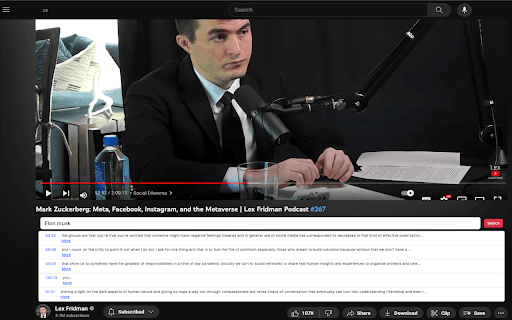
YouTube Ultimate Search is a powerful Chrome extension designed to improve your video browsing experience. It allows you to quickly find specific content within any YouTube video by analyzing transcripts. The extension adds a convenient search box below the video, providing accurate results with timestamps, saving you time and effort.
How to Use
Install the Chrome extension. A search box will appear below the YouTube video. Enter your keyword or phrase, and view search results with timestamps. Click a timestamp to jump directly to that part of the video.
Features
- Search within YouTube transcripts with timestamps
- Integrates seamlessly with the YouTube interface
- Enables quick navigation to relevant video segments
- Powered by OpenAI Embeddings for precise results
Use Cases
- Find specific details in lengthy YouTube videos without watching the entire content
- Research topics discussed across multiple videos efficiently
- Locate particular information in tutorials or lectures instantly
Best For
Content creatorsResearchersStudentsEducatorsProfessional editors
Pros
- Delivers precise search results using advanced OpenAI Embeddings
- Enables quick navigation with timestamp links
- Simple, intuitive user interface
- Reduces viewing time by enabling targeted searches
Cons
- Supports only English-language videos currently
- Dependent on the accuracy of available video transcripts
FAQs
What is YouTube Ultimate Search?
It is a Chrome extension that allows users to search within YouTube videos using their transcripts for quick content location.
How does YouTube Ultimate Search function?
It adds a search box below videos, analyzes transcripts with OpenAI Embeddings, and displays results with timestamps for easy navigation.
Which languages are supported?
Currently, the extension supports only English-language videos.
Is the extension easy to install?
Yes, simply install it from the Chrome Web Store, and the search box appears below YouTube videos automatically.
Can I search within any YouTube video?
Yes, as long as the video has an available transcript in English, you can search within it.