

Youtube Ultra Focus Mode
Enhance your YouTube experience with this extension that filters suggestions based on focus keywords, helping you stay focused and productive.
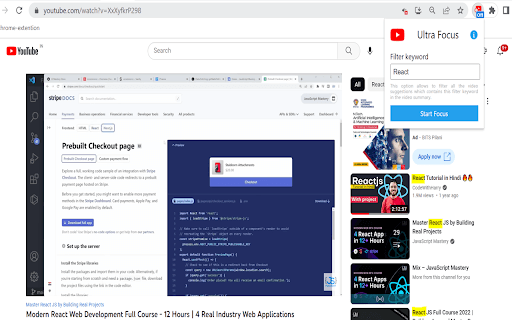
About Youtube Ultra Focus Mode
YouTube Ultra Focus Mode is a productivity-enhancing extension designed for viewers who want an interruption-free experience. It streamlines suggestions by filtering videos based on a user-defined focus keyword, reducing distractions from unrelated content and saving time.
How to Use
Install the extension, input your focus keyword, and it will filter YouTube suggestions accordingly. To deactivate focus mode, click the stop button in the extension interface.
Features
- Quick toggle to enable or disable focus mode
- Filters YouTube suggestions based on your chosen focus keyword
- Applies filtering across all YouTube tabs for consistency
- Reduces unrelated video suggestions to maintain focus
Use Cases
- Professionals concentrating on specific tutorials or training.
- Users avoiding time-wasting or irrelevant videos.
- Students focusing on particular research topics.
- Content creators staying on niche topics.
- Anyone seeking a distraction-free YouTube environment.
Best For
ResearchersProfessionalsStudentsContent creatorsProductivity enthusiasts
Pros
- Simple to activate and deactivate with one click
- Helps save time by filtering relevant videos
- Boosts productivity during YouTube sessions
- Minimizes distractions from unrelated suggestions
Cons
- May exclude useful videos related to the focus keyword
- Effectiveness depends on the accuracy of the keyword used
- Could limit exposure to diverse content outside the focus area
FAQs
What is YouTube Ultra Focus Mode?
It filters YouTube suggestions based on your selected focus keyword, reducing unrelated video recommendations.
How do I activate and deactivate the focus mode?
Install the extension, enter your focus keyword, and toggle the filter on or off using the extension button.
Does this extension work across multiple YouTube tabs?
Yes, the filtering applies globally across all open YouTube tabs for consistent focus.
Can I change the focus keyword anytime?
Absolutely, you can update the focus keyword whenever you want to adjust your filtering preferences.
Will this extension block all suggested videos?
It filters suggestions based on your focus keyword but may not block every unrelated video entirely.