

Zoovu Browser Plugin
Zoovu Chrome Extension enables seamless testing and deployment of digital assistants directly within your browser, streamlining development and integration processes.
About Zoovu Browser Plugin
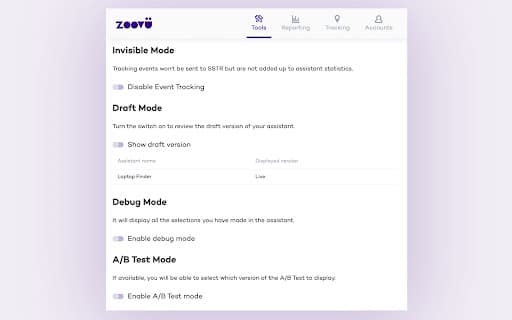
The Zoovu Chrome Extension provides a powerful platform to test, integrate, and refine digital assistants directly within your web browser. Features like Invisible Mode, Draft Preview, and Debug Mode facilitate efficient development, troubleshooting, and deployment of digital assistants on your website.
How to Use
Install the Zoovu Chrome Extension, then activate Invisible Mode to disable interaction tracking during testing. Use Draft Preview to view recent changes without publishing, and Debug Mode to verify recommendation logic. During A/B testing, select the desired assistant version. The Tracking tab generates code for easy integration into your ‘Thank You’ page.
Features
- Select different A/B test versions
- View key performance indicators (KPIs)
- Enable Invisible Mode to disable tracking
- Use Debug Mode for recommendation verification
- Preview recent changes with Draft Mode
- Generate tracking code for websites
Use Cases
- Embedding tracking scripts into 'Thank You' pages without custom coding
- Testing digital assistant functionalities before going live
Best For
Pros
- Simplifies testing and deploying digital assistants
- Includes debugging and preview features for efficiency
- Eases integration of tracking scripts into websites
- Supports A/B testing with KPI monitoring
Cons
- Requires an active Zoovu platform account
- Limited to features available within the extension