

ZumaPiano
AI-driven Chrome extension designed to enhance piano learning through personalized practice guides and song analysis.
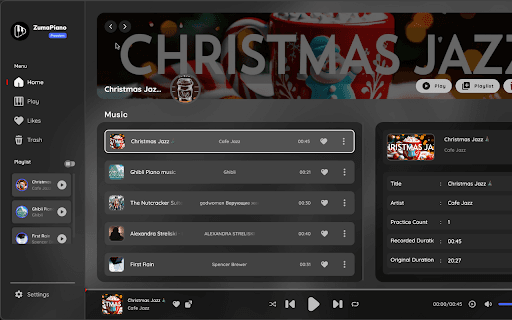
About ZumaPiano
ZumaPiano is an innovative AI-powered Chrome extension that revolutionizes how you learn piano. It enables you to play any song by instantly generating customized learning guides, simplifying practice sessions, and eliminating the need for countless tutorials and lessons.
How to Use
1. Select a piano solo track from any website. 2. Launch the ZumaPiano extension and click 'record' to capture the song. 3. After recording, ZumaPiano processes the audio and creates a practice guide. Use the 'Practice' button to view the piano roll and start practicing.
Features
- Customizable Note Display: Toggle note names on keys for personalized learning experiences.
- Multiple Practice Modes: Switch between audio-only playback or visual note-guided practice.
- Advanced Playback Controls: Adjust speed, volume, enable looping, autoplay, and more for optimized practice sessions.
- Create Practice Playlists: Organize your favorite songs into playlists for structured practice.
- Personalized Song Library: Manage, edit, and recover your song collection with custom titles, artists, and cover images.
Use Cases
- Organizing your favorite songs in a personalized library.
- Creating tailored practice playlists for focused sessions.
- Learning new songs by recording and generating custom guides.
Best For
Pros
- Customize your song library and practice playlists effortlessly.
- Simple, intuitive setup with a quick 3-step process.
- Offers flexible learning modes and advanced playback options.
- AI-powered guides tailored to any song for efficient learning.
Cons
- Requires Google Chrome browser to operate.
- Audio quality impacts recording accuracy.
- Limited to two songs in the free version.
Pricing Plans
Choose the perfect plan. All plans include 24/7 support.
Premium Version
One-time payment unlocks all features and unlimited song library
Get Started